
Manually matching invoices against the PO in Excel?
Match every invoice to its PO, instantly
Pulsify checks every invoice line against the PO, including price and quantity. Partial deliveries get matched and you only review the exceptions.
· Take the interactive tour ·No credit card. Set up in minutes


Trusted by AP teams across Australia
I just wanted to say how impressed I am with the program's document reading capability. It even manages to split out a Coles receipt line by line with the correct GST application on each item!
Kate Mazar
Pulsify Customer
This is the 4th solution I have used for uploading receipts and it is much better than all the others. Being able to scroll, zoom and grab a receipt in the window and move it about for review is very user friendly. The interface is very clean and avoids all the noise that other solutions pack into a page.
Verified User
Xero App Store review
Have used Dext before and this was much easier to get up and running. Instant line-item splits and AI coding, super clean interface, and the duplicate detection/ABN verification is robust.
Daspal Gill
Xero App Store review
Pulsify saves hours each week by auto-coding line items and flagging issues like duplicates, GST errors, and mismatches before bills hit the ledger.
Justin Tomas
Indiana Advisory
Pulsify has made a huge difference to how we manage accounts payable in our construction business. With high invoice volumes, multiple suppliers, and complex bills across projects, AP used to be slow and error-prone. Pulsify's AI-driven automation has brought clarity and control to the process, significantly reducing manual work and improving accuracy.
Matthew Carollo
NACS Construction
We implemented Pulsify on recommendation and it has been our biggest win this year so far. Setup was magically simple and both the itemisation and process automation have really delivered. Much better than our previous use of Hubdoc + manual processes
Sean Cornell
Xero App Store review
I have tried many different AP processing apps for SMEs I have been involved with and this one is by far the most straightforward solution I have come across that doesn't require complex upfront set up. Sign up and go. Highly recommend
Verity Enright
Xero App Store review
I need this for import and shipping costs which have all sorts of GST, non-GST, part GST requirements, so Pulsify solves the complications of finding this and breaking it down at the end of each quarter for the accountant. Having previously used Dext, getting this detail was an extra expense and assigning costs was much more work.
Verified User
Xero App Store review
Pulsify has given me the confidence I needed and has helped reclaim a significant amount of my time, which will be crucial as we continue to scale our operations.
George Gorgi
CareMax Mobility
Really love they extract payment data from the bills and reconcile them to my Xero database. Gives me peace of mind that my invoices are secure.
Verified User
Xero App Store review
How Pulsify matches to the PO

Step 1
Connect your email inbox
Connect your Outlook inbox and supplier invoices come straight in. Or forward them to your Pulsify address. PDFs, scans and photos all work.
Step 2
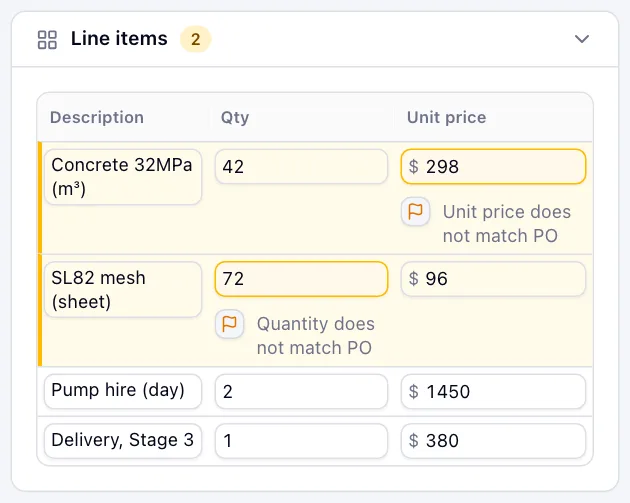
Checked line by line
Each invoice line is matched to its PO line. A different unit price or quantity is flagged on that line, even when the totals agree.
Step 3
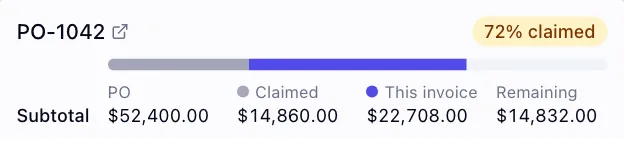
Partial claims tracked
When a PO is billed across several invoices, Pulsify shows what's been claimed, what this invoice adds and what's left. Anything billed past the PO is marked as over.
Step 4
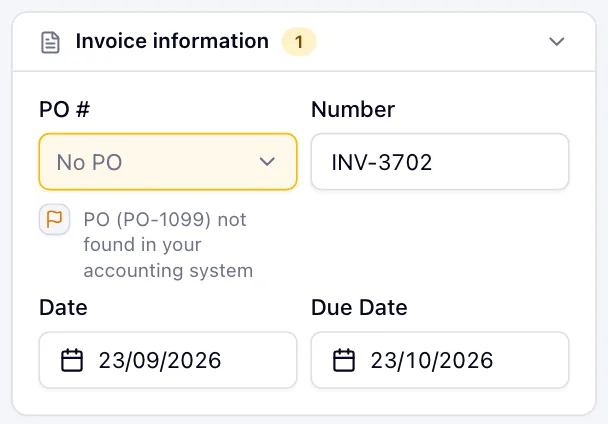
Wrong or missing PO
Pulsify finds the PO from the number on the invoice. A missing PO number, a PO that isn't in Xero or MYOB, or one raised to another supplier is flagged.

Step 5
You approve, it syncs
Review the coded invoice, approve, and it posts straight to Xero or MYOB. No re-entry, no export and import.
Simple pricing. No per-user fees.
PO matching included on every plan.
Get Control
$69/mo
100 documents/month
Growing
$159/mo
250 documents/month
Scale
$369/mo
750 documents/month
All prices AUD ex-GST. Full pricing details