
PO Matching for Xero & MYOB
Invoices checked against what was ordered before you approve them.
2-way matching
Invoices are compared against open purchase orders synced from Xero or MYOB.
Variance detection
Quantity over the PO and unit price differences are flagged line by line. Going over the PO total shows as Over.
Handles partial claims
Pulsify tracks what has already been claimed against a PO and what is left to claim. Bills keyed straight into Xero or MYOB are not counted.
How it works
Invoice linked to PO
When an invoice quotes an open PO number, Pulsify links that PO. You can also pick one from the PO # field.
Line-by-line comparison
Each invoice line is matched to a PO line and its quantity and unit price compared.
Variances assessed
A line billing more than was ordered, priced differently or not on the PO at all is flagged for review.
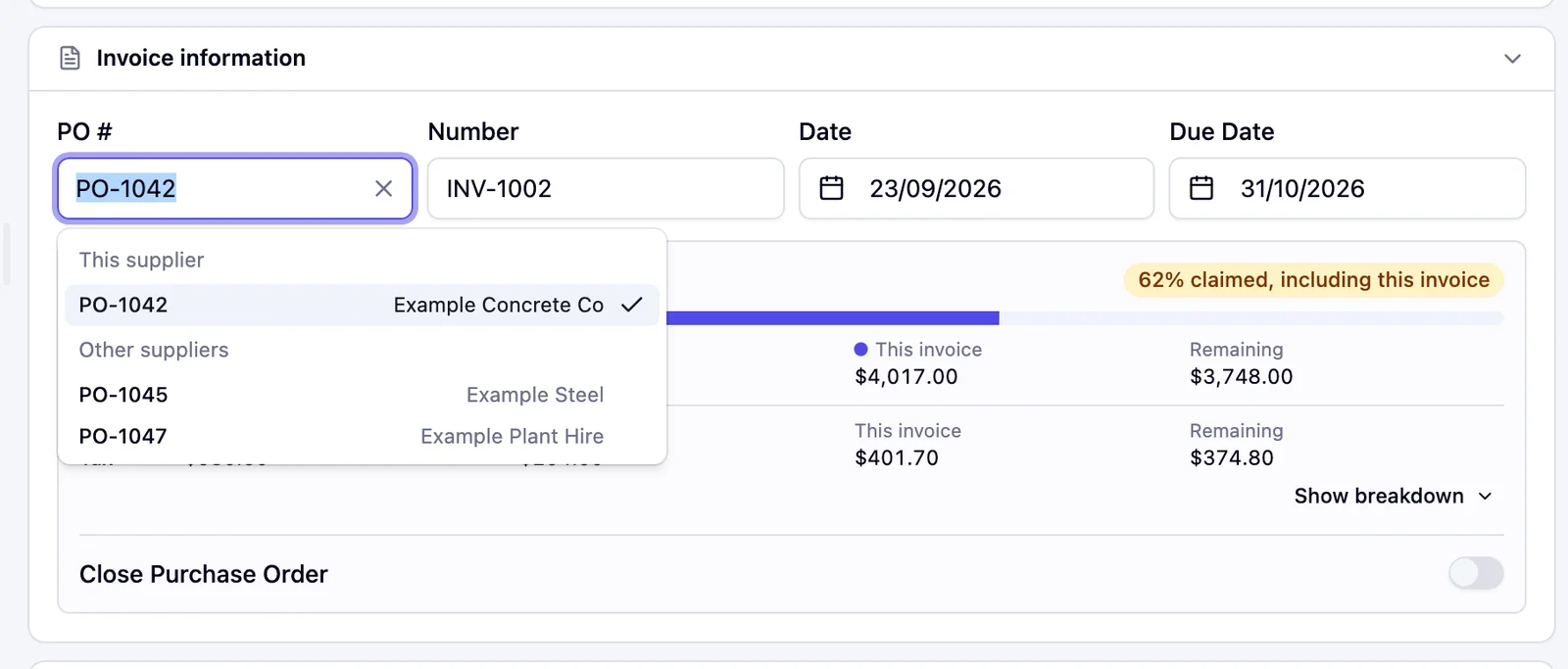
Pick the PO
Open purchase orders for the invoice's supplier are listed first, under This supplier.
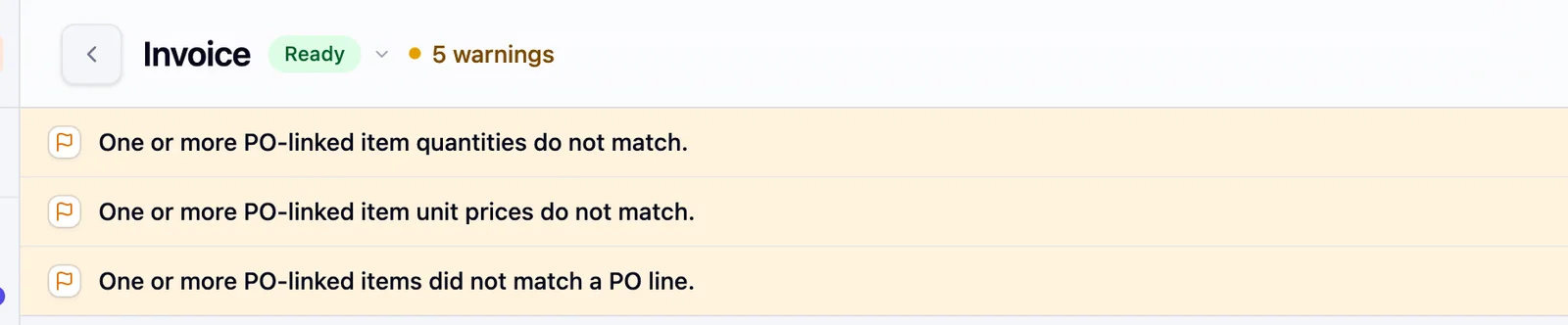
Line-level checks
Each invoice line is checked against its PO line for quantity and unit price.
Built for real purchasing complexity
Why header-level matching isn't enough
Two invoices can have the same total and still be completely different at the line level. A PO raised for 50 units of material A and 20 units of material B gets invoiced for 70 units of material A and nothing for B. The totals match but the delivery doesn't. Header-level matching, comparing invoice total against PO total, passes this without a flag. Line-level matching catches it.
For construction businesses, where a single PO might cover multiple material types across multiple deliveries over weeks, line-level matching is the only kind that's meaningful. An invoice for partial delivery on an AU$180,000 framing materials PO needs to be matched against the specific lines invoiced, as well as the PO total.
What discrepancies look like in practice
Pricing drift and unit-of-measure errors cause many PO mismatches in Australian construction and distribution AP. A supplier quoted AU$4.20 per unit at PO time and invoiced at AU$4.65 because their price list changed between order and delivery. A PO raised in tonnes gets invoiced in kilograms, creating a 1,000x apparent variance someone has to look at before approving it.
Discovering these discrepancies at the approval stage, after the AP officer has already entered the invoice and coded it, means rework. Discovering them at intake, as part of an automated matching check, means the AP officer can resolve the variance with the supplier before it touches the ledger or wastes an approver's time.
Partial deliveries and staged invoicing
Most real purchasing doesn't happen in a single delivery against a single invoice. A PO for AU$50,000 in equipment might be fulfilled across three deliveries with three separate invoices, each for a different subset of the line items. Matching needs to track what's already been invoiced against the PO and what remains outstanding. Otherwise the third invoice looks like a variance against the full PO value rather than a partial fulfilment against what's left. For wholesale distributors managing ongoing supplier accounts with rolling POs, getting this right is the difference between a useful matching system and one that generates so many false exceptions it gets turned off.
Frequently asked questions
Two-way, invoice to PO. There are no goods receipts. Separate checks also catch duplicates, changed bank details, ABN problems and totals that don't add up.
The line is flagged with the difference, such as how many units over the PO it is or the PO's price.
Yes. Each invoice against a PO shows what has already been claimed, what this invoice claims and what is left. A line billed for fewer units than ordered is not flagged for quantity once it is matched to its PO line.
No. Pulsify flags the difference and your team decides.
A PO line with a quantity of 1 is treated as a lump sum. Progress claims against it are not flagged for quantity or unit price. The PO panel shows how much of the PO has been claimed. On MYOB the PO must be raised to the same supplier as the bill. MYOB service PO lines are treated as lump sums.
Related features
Automated Line-Item Coding
Account and GST coded on every line.
Validation & Exception Review
The checks that run beyond PO matching.
Invoice Processing Automation
Capture and structure invoices before matching.
Fraud Prevention
Mismatched bank details flagged alongside PO variances.
AP Automation Overview
See how PO matching fits the full workflow.
Related articles
Blanket Purchase Orders: How They Work and How to Match Invoices Against Them
How a blanket purchase order system works for Australian businesses, how to match each invoice against it and how Xero and MYOB handle blanket POs.
PO MatchingThree-Way Matching in Accounts Payable: How It Works and When You Actually Need It
Three-way matching compares invoice, purchase order and goods receipt before payment. How the process works, and why Xero and MYOB cannot do it natively.
PO MatchingWhy PO Matching Fails in Construction and What to Do Instead
PO matching breaks down in construction because invoices rarely arrive clean. How project-based businesses can make purchase order matching work.