
Supplier Statement Reconciliation
Statements are matched line by line against what you already hold.
Every line matched
Each invoice and credit line is matched to an invoice in Pulsify that is in the queue or approved, or to a bill in Xero or MYOB. Xero credit notes are matched too. Matching is on supplier and reference.
Exceptions named
A line that does not match says why. Not found, listed twice, amount differs, outside the period.
Balance tie-out
Opening balance, the net of the lines and the closing balance. A gap does not block reconciling and is recorded in the notes against your name.
How it works
Forward the statement
Send it to your Pulsify address with everything else. Pulsify works out that it is a statement.
Lines matched
Date, due date, reference, type and amount are read off every line. Invoice and credit lines are then matched against Pulsify and Xero or MYOB.
Mark as reconciled
Accept a variance or mark a line as not matched from its status menu. Both are recorded with who and when. Mark as reconciled works once nothing is left blocking it.
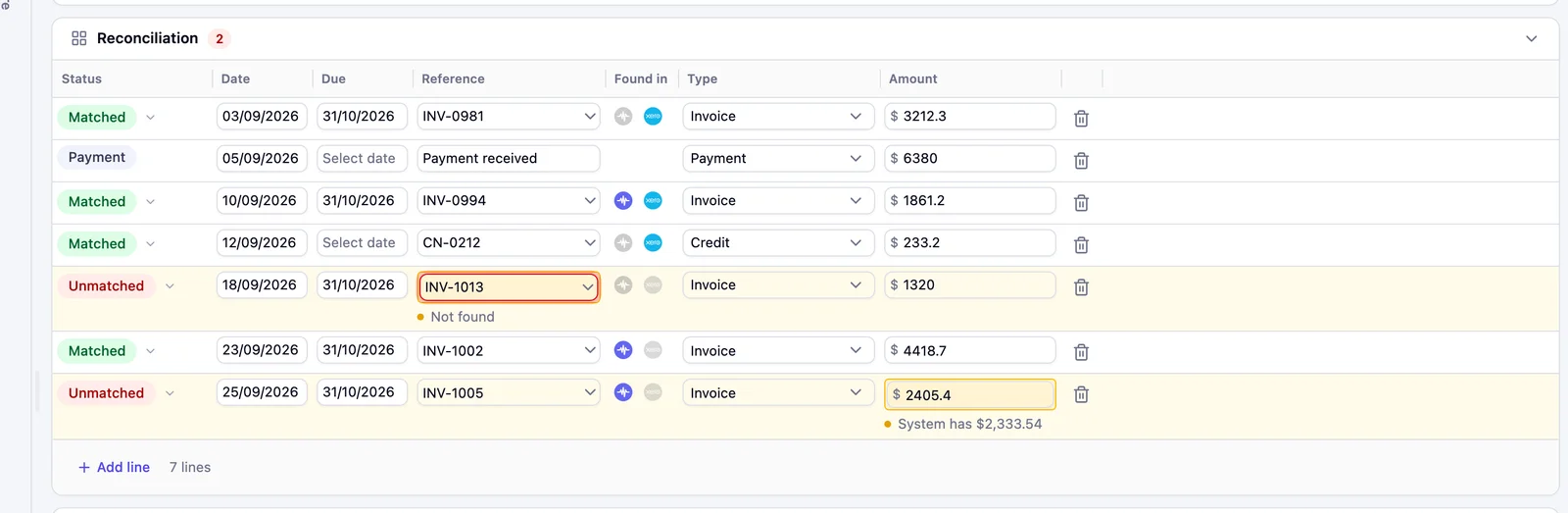
Every line checked
Each line reads Matched, Unmatched or Payment, with the reason under any line that did not match.
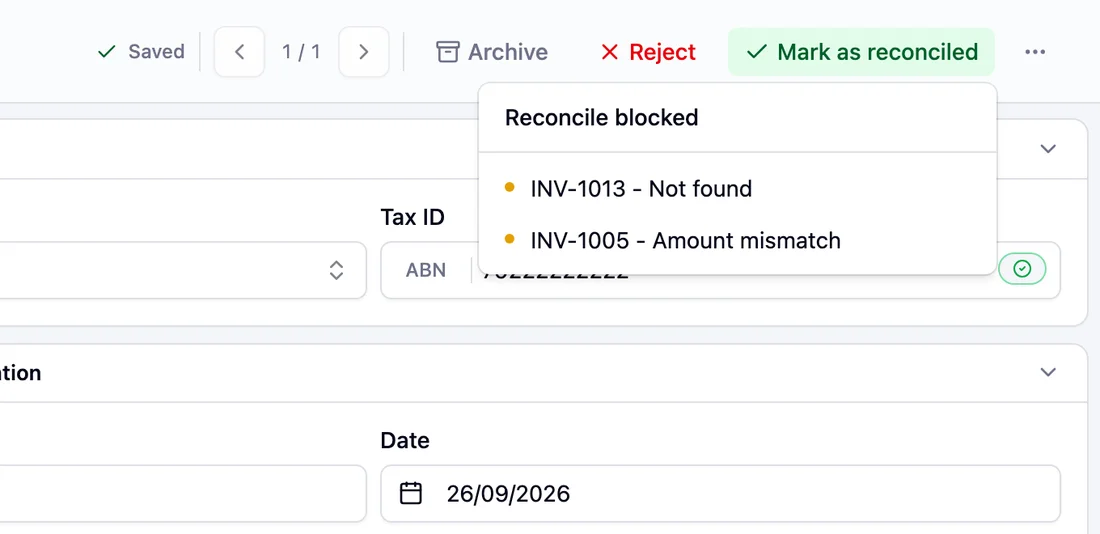
What is in the way
Mark as reconciled lists what is still stopping it, by reference and reason.

Reconciled
The statement shows Reconciled, then moves to Processed.
What the reconciliation catches
Why statements get left until something goes wrong
A supplier statement is the only view of your account that comes from outside your own ledger. It is also the slowest thing in AP to check by hand. A monthly statement from a materials supplier can run to eighty lines, and each one has to be found in Xero or MYOB before anyone can say whether the balance is right.
So most teams check statements when a supplier chases a payment, or when a credit hold stops a delivery. By then the missing invoice is two months old, the job it belonged to has been costed without it and the person who would have known where it went has moved on.
How matching works
Each invoice and credit line is matched on supplier and reference number. Case, spacing and punctuation are forgiven, along with a leading word like Invoice. Leading zeros and a /00 suffix are forgiven only when the amount also agrees. If a reference holds one number among other words, Pulsify reads that number when only one record fits and the amount agrees. There is no tolerance on the amount.
A line that does not resolve says which of those went wrong. No reference printed. No invoice with this reference for this supplier. Two invoices carrying the same reference. Another line on this statement already holds that invoice. The amount on record differs, and here is what we hold. Dated outside the period the statement covers.
The arithmetic has to agree
Every statement carries three figures. The opening balance, the net of the lines and the balance the supplier says is outstanding. When the first two do not add up to the third, the statement says so. Reconciling still goes ahead once you confirm the gap, and a note of it stays on the statement with a name and a time against it.
When the opening balance, the closing balance or a line amount was not read, the Balance card asks you to type it in from the preview. Reconcile without it and you confirm the balance was not checked. That is recorded too.
Lines keep checking themselves
A statement often arrives before the invoice does. Lines re-match when a new invoice lands in Pulsify and again when Xero or MYOB syncs. A line that read as missing on Monday reads as matched once the invoice turns up. A variance you have already accepted, or a line you have marked as not matched, stays where you put it.
Frequently asked questions
Yes. Lines match against approved bills synced from Xero or MYOB, Xero credit notes and invoices in Pulsify that are in the queue or approved. Draft bills in Xero are not matched. MYOB credit notes are not read.
Payments are not matched to invoices. They feed the balance instead.
No. A statement is read against your ledger. It never creates or changes a bill, and it is never sent to an approver.
Reconciling is not blocked. The gap is shown and you confirm it before reconciling. The gap and your name are kept as a note on the statement.
Admins, approvers and reviewers. Submitters do not see them. All three can reconcile, reject and restore a statement.
Yes. Each line shows whether it was found in Pulsify and in Xero or MYOB. Each mark opens that record.
Related features
PO Matching
Invoice lines checked against the order before you approve.
Validation & Exception Review
The checks that run on every invoice before it is approved.
Fraud Prevention
Duplicates, changed bank details and ABNs that do not check out.
Invoice Processing Automation
How documents get into Pulsify in the first place.
AP Automation Overview
Where statements sit alongside the rest of AP.
Related articles
How South African Businesses Stop Invoice Fraud Before the EFT Run
Invoice fraud prevention software for South African businesses: who is liable, why manual bank-detail checks fail at volume, and how to control it in Xero.
Financial Control & GovernanceInvoice Fraud Detection Software for Australian Businesses in 2026
Comparison of invoice fraud detection and prevention software for Australian businesses in 2026, covering Pulsify, Eftsure, ApprovalMax, and native controls.
Financial Control & GovernanceSMB Accounting in Australia: Why 20-Person Businesses Have the Highest Per-Invoice Fraud Exposure
Australian SMBs carry the highest per-invoice fraud risk - large enough for volume, too small for dedicated AP controls. Here's how to close the gap.